Sitemap Parsing and URL Discovery Strategies
Choosing URLs wrong breaks everything downstream in your pipeline.

Before a single byte of content gets pulled from a website, a quieter decision already determined whether that content pull was worth making: which URLs to fetch in the first place. That question used to be a crawling afterthought. It now sets the data quality and the operating cost of the whole pipeline before anything else happens.
Get the URL list wrong and the damage doesn't stay contained to the list. A missing URL becomes a missing document in the corpus. A stale URL becomes outdated context handed straight to a model, which then answers questions with confidence about facts that changed last week. The web these pipelines operate on is also being read by a crowd now, not just one kind of visitor. Conventional search crawlers, AI-search retrieval systems, user-triggered fetchers, RAG pipelines, and browser agents are all hitting the same pages, each with its own appetite for completeness and its own tolerance for gaps. A Cloudflare analysis found that crawling by search engines and AI services jumped 24% year-over-year in June 2025. Knowing, before spending any budget, what's actually there to crawl is what matters.
What sitemaps are and what the XML format encodes
A sitemap is a site owner's statement of intent, not a snapshot of reality. It's an XML document listing the URLs someone wants indexed, sometimes with freshness metadata attached, but it describes what should be crawled rather than what currently is. That gap is what the next section examines: how it should be crawled diverges from what currently is.
The format comes in two basic shapes. A sitemap index is a parent document that points to other sitemaps, which is how large sites split enormous URL lists across multiple files. A URL set sitemap is the leaf document, the one actually holding page URLs, along with optional fields like lastmod, changefreq, and priority. Specialized versions exist too, built for images, video, and news content, each tuned for how a particular indexer wants that content described. The whole format is standardized by sitemaps.org and read by Google, Bing, and the rest of the major players.
Of the optional fields, only one still carries real weight. Google's current documentation ignores priority and changefreq outright, but it does use lastmod, provided the value is consistently and verifiably accurate. Finding the sitemap in the first place follows a known order: check robots.txt for a Sitemap: directive first, since that's the canonical spot, and fall back to guessing at /sitemap.xml, /sitemap_index.xml, /sitemap-index.xml, or /wp-sitemap.xml for WordPress sites if the directive isn't there. For large e-commerce catalogs or news portals running into the hundreds of thousands or millions of pages, a well-organized sitemap keeps crawl scope sane and keeps servers from buckling under uncoordinated requests.
Sitemap parsing failures: the gap between declaration and crawlable reality
A sitemap tells a pipeline what a site owner meant to publish. It says nothing about what's actually live right now, and that gap is exactly where discovery pipelines lose pages without ever noticing.
Start with staleness. Because sitemaps get generated on a schedule rather than on every publish event, a page added an hour ago might not appear for a full day, while a page deleted last week might still sit in the file. Plenty of CMS platforms cap the sitemap at a fixed size or only bother listing "important" routes, so entire paginated or deep sections of a site never make the list at all. A pipeline that treats the sitemap as gospel inherits every one of those omissions silently.
The lastmod field has its own trap. Many CMS platforms rewrite lastmod on every regeneration cycle whether or not the content actually changed, so the timestamp ends up measuring when the sitemap was rebuilt. Building an incremental crawl around filtering by lastmod causes the pipeline to over-fetch pages that never changed while still missing pages that did change but whose CMS never bothered to update the field correctly. The field is a hint. Treating it as a guarantee is how freshness logic quietly breaks.
Some sites skip the whole exercise. Internal tools, smaller marketing sites, and hand-built pages frequently ship with no sitemap at all, and a discovery step that depends on sitemap.xml existing just returns an empty list, stalling the crawl before it starts.
Dynamic content adds another blind spot. Search-result pages, filtered listings, faceted navigation, and routes generated by JavaScript are routinely missing from sitemaps, simply because no one enumerated them by hand. Those are often precisely the pages a pipeline needs most, like product variants or freshly assembled category pages, and reading the sitemap alone will never surface them.
The most common implementation failure, though, is structural rather than editorial. A sitemap index can reference dozens or hundreds of child sitemaps, each holding thousands of URLs, and most hand-rolled parsers never recurse into those child files. Picture a large site's index as a root pointing to dozens of category sitemaps, each stuffed with thousands of entries. Sitemaps.org allows an index to reference up to 50,000 child sitemaps, so a parser that stops at the root walks away with a list of other sitemaps, not a single actual page.
None of these are bugs a target site can fix by cleaning up its sitemap hygiene. They're built into what a sitemap is: a declaration, generated on someone else's schedule, describing someone else's intent. A second discovery strategy has to exist alongside it.
How active URL mapping works
Active URL mapping flips the approach entirely. Instead of reading a file someone else wrote, it discovers what's live and reachable by starting at an entry point and following links the way an actual visitor would, surfacing pages no sitemap would ever think to list. Where sitemap parsing is archaeology, reading an artifact left behind, active mapping is live reconnaissance.
That traversal catches what sitemaps miss: pages published too recently to make the next sitemap generation cycle, dynamic routes and filtered listings nobody enumerated, and entire sections a sitemap generator was configured to leave out. It also handles the sites with no sitemap at all gracefully. Active mapping just falls back to following links from the entry URL, producing a usable inventory where sitemap parsing would hand back nothing.
Active mapping discovers reachable reality, not hidden reality. It won't invent a page sitting behind a login wall, and it won't find a page that's never linked from anywhere crawlable. If nothing points to it, mapping won't find it either.
The practical value appears in sequencing: mapping is a deliberately separate, cheap step that runs before any content extraction, so the URL count and the shape of the site are visible up front, and the decision about which subset to crawl happens with full information instead of being discovered mid-crawl after the budget is already gone. Left completely open-ended, though, a traversal can run forever, so production systems bound it with parameters like maxDepth, the number of link hops from the entry point, capped at 10, and maxPages, a total page budget capped at 1000, turning an unbounded crawl into a scoped, predictable job.
An estimated 60-70% of major websites now lean heavily on client-side rendering: a headless browser, not a simple HTML fetch, is required to discover URLs inside single-page applications, dynamically loaded listings, and infinite-scroll pages. Running a browser to discover links costs more, computationally and in wall time, than reading a static XML file. That cost is why the next section isn't "pick one strategy" but "run both."
Combining both strategies into a production-grade discovery layer
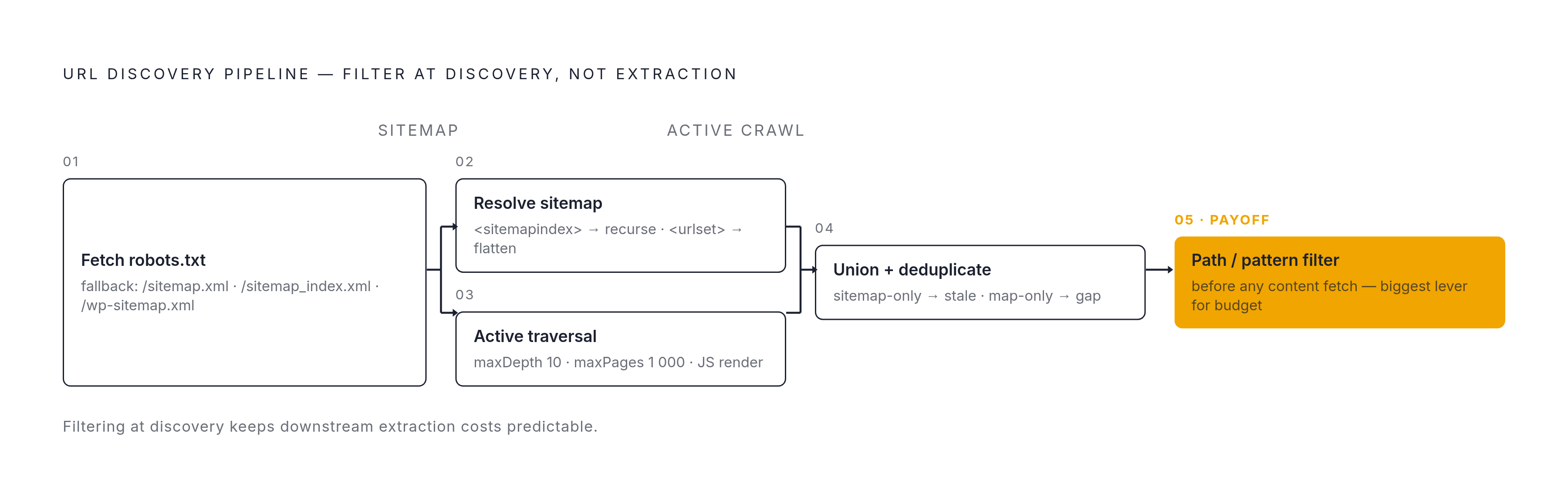
Neither strategy wins outright, because they're solving different problems. Sitemap parsing hands back the declared set cheaply and instantly, the author's own intended index, with no traversal noise attached. Active mapping fills in what that declaration leaves out: the recently published pages, the dynamic routes, the sections the sitemap generator was never configured to include. Union the two URL sets and deduplicate, flagging URLs present only in the active map as sitemap gaps and URLs present only in the sitemap as potentially stale or removed, and the resulting inventory is more complete than either source produces on its own.
In practice that plays out as a five-step sequence. The pipeline starts by fetching robots.txt to find any declared sitemap location, falling back to common paths like /sitemap.xml, /sitemap_index.xml, or /wp-sitemap.xml if no directive turns up. From there it has to resolve the sitemap recursively: check whether the root document is a sitemap index or a URL set, then recurse into every child sitemap until the whole structure flattens into one list of URLs. Alongside that, a link-following traversal runs from the entry URL, bounded by depth and page caps, with JavaScript rendering handled for single-page applications and other dynamic routes. Only after that merge does any filtering happen: path-prefix or pattern filters get applied to the combined set to scope the crawl before a single page gets fetched for content.
That last step is where the real cost savings live. Trimming the page set during discovery, before any extraction begins, is the single biggest lever for keeping downstream budget predictable, because every URL that gets filtered out at this stage is a fetch, a render, and a token cost that never has to happen. Organizing sitemaps by logical groupings compounds that benefit: segmenting by content type, like products versus blog posts versus categories, or by update frequency, means an incremental run can target only the freshest segment instead of re-processing the entire declared set from scratch.
Scale introduces its own mechanical problems. A site with several hundred thousand URLs produces a large in-memory list once the union step runs, and processing that list in chunks avoids memory pressure while letting downstream fetching happen in parallel rather than one URL at a time. Active mapping also runs into anti-bot friction at scale, since bot detection and JavaScript rendering both have to be handled for discovery to stay accurate across an entire domain, and that's generally the point where a managed crawl API earns its keep over a hand-rolled link-follower, since bypassing anti-bot measures and rendering single-page applications correctly across thousands of pages is a different engineering problem than following a few links on a small site.
That's the strategy layer settled: read the sitemap, map actively, union, filter, fetch. What still trips up a lot of otherwise solid pipelines is simpler than any of that: actually parsing the sitemap XML correctly in code.
Implementing reliable sitemap parsing: the failure modes most hand-rolled parsers miss
Most sitemap parsers fail on the basics: recursive index resolution, compressed files, and what happens when a network request just doesn't come back.
Recursive resolution is the one that trips up the most code. The root element tag tells a parser everything it needs to know: <sitemapindex> means there are child sitemaps to fetch, <urlset> means the actual page URLs are sitting right there. A parser has to check that tag and branch accordingly, rather than assuming every document it fetches is the final one. Skipping that check means a large site's index, which can require pulling many child sitemaps just to recover the full URL list, returns nothing but a list of other sitemap files, never the pages themselves. Fetching those child sitemaps one at a time is also slower than it needs to be. The sitemapper Node.js library, for one, supports configurable concurrency specifically so child sitemap fetches can run in parallel and cut wall time significantly.
Network behavior is the other quiet killer. A sitemap sitting on a slow CDN, or a WordPress install struggling under load, can stall an entire pipeline if no timeout is configured, since the parser just sits there waiting indefinitely for a response that may never come. The practical range for a per-request timeout is 10 to 20 seconds: shorter than that and the parser gives up on servers that were just being slow but valid, longer than that and one hung request blocks everything behind it in the queue. A sane timeout combined with retry logic and recursive resolution that actually recurses stops a sitemap parser from being the invisible point of failure it so often is in hand-rolled crawling code.