Parsing JavaScript-Rendered Content
Building a browser automation stack beats fighting detection systems alone.

Parsing JavaScript-rendered content needs a different infrastructure stack than scraping plain HTML ever did, one that runs actual browser environments, tracks rendering events in real time, and hands off structured output that an AI system can actually use. The gap between a scraper that works in a demo and one that survives contact with production is entirely about whether that pipeline holds together end to end.
Why JS rendering is now the default problem in web scraping
Over 70% of web pages need JavaScript to run before there's any meaningful content to grab How to Scrape JavaScript-Rendered Pages in 2026 (SPA, React, Vue) | K…. That's the baseline now.
Blame the framework ecosystem, or thank it, depending on your mood: React, Next.js, Vue, Nuxt, Angular, Remix, Astro. None of these are edge cases. They're the modern web, and they all share one habit: rendering content client-side instead of shipping it pre-baked in the HTML.
Send a plain HTTP request to one of these sites, and what comes back is a shell: <div id="root"></div> and basically nothing else. The content you actually wanted is sitting somewhere in a JavaScript bundle, waiting for a browser to execute it.
Four scenarios trip up engineers who assume "just fetch the page" is a complete strategy. Infinite scroll means content only shows up after a user (or a script pretending to be one) triggers a scroll event. Client-side hydration means the server sends bare-bones HTML, then swaps it out or fills it in once the JS bundle finishes loading. Code splitting means the chunk holding the data you want might not even be loaded yet when your scraper tries to read the page. And post-load API calls, the prices, inventory counts, personalized recommendations, often get fetched after the initial render, so a static parser never sees them at all.
None of these problems is especially hard on its own. The trouble is they stack. Rendering issues don't replace the older scraping headaches (rate limits, pagination, malformed markup), they pile on top of them. So the actual challenge isn't "how do I run JavaScript." It's how you build something that survives all of this happening at once, on a hundred different sites, each with their own quirks.
How headless browsers execute JavaScript at the rendering layer
A headless browser processes scripts, handles network calls, fires the same hydration events a real user's browser would fire, and populates the DOM the same way. It's not faking anything. It's the real rendering engine, just running without a visible window.
Three tools dominate this space right now.
Playwright, currently at version 1.62.0, released July 24, 2026, and requiring Python 3.10 or newer, has become the default choice for new projects as of 2026. It bakes automatic waiting into its core design: instead of guessing how long to pause, you wait for a selector to appear. Less glue code, fewer flaky tests.
Puppeteer, a Node.js library built originally by Google's Chrome DevTools team, wraps the DevTools Protocol directly. It's still a reasonable choice if there's existing Puppeteer code already running in production. Starting fresh with it in 2026, though, is a harder case to make How to Scrape JavaScript-Rendered Pages in 2026 (SPA, React, Vue) | K….
Selenium WebDriver is the longest-established of the tools, with native Safari support and Selenium Grid for distributed sessions. Teams that already lean on Selenium for testing infrastructure often stick with it rather than bolt on a second browser automation stack just for scraping.
PhantomJS pioneered headless browsing years ago, but development was shut down in 2018, so it's not a живой option today.
Waiting for "network idle" sounds like a solid readiness signal, but it isn't reliable across all sites, which means site-specific wait logic is often unavoidable, and this trips up almost everyone who's new to it. The core mechanism involves launching a real browser engine, navigating to the URL, waiting for JS to run, then reading the rendered DOM, not the raw HTML.
The infrastructure cost of running your own browser fleet
Nobody puts this part on the recruiting poster. Each browser instance eats somewhere between 200 and 500 MB of RAM, so ten of them running concurrently will chew through memory fast Scraping Dynamic JavaScript Websites: Techniques & Fixes. Run a hundred, and congratulations, infrastructure is now your full-time job.
Memory leaks build up quietly across sessions that don't get torn down properly. Worker pools, job queues, health checks, auto-restart logic on crash, none of that comes free. It all has to get built, and it takes real time before any of it feels stable.
For a team building an AI product, this is where the math gets uncomfortable. Browser infrastructure isn't the product. It's plumbing. Every hour spent debugging a zombie Chromium process is an hour not spent on extraction quality or the actual AI layer that customers care about. That trade-off is easy to lose sight of when the scraper "sort of works" in a demo. Among the infrastructure costs of running your own browser fleet are zombie processes that OOM-kill servers at off-hours.
Managed browser infrastructure options
By 2026, most production scraping setups lean on browser-based rendering in some form How to Scrape JavaScript-Rendered Pages in 2026 (SPA, React, Vue) | K…. The real question isn't whether to use a browser, it's who manages the fleet of them.
Four managed approaches are worth knowing apart, because they solve different slices of the problem.
Cloud actor platforms let teams deploy scraping logic as packaged units, while the platform underneath handles scaling, proxy rotation, and result storage, no Docker configs, no server babysitting. Headless-browser-as-a-service options work differently: connect over WebSocket, control a remote browser instance directly, write the Playwright or Puppeteer logic yourself, and let someone else run the actual fleet, often with stealth configurations already applied. Remote CDP endpoints serve a narrower need: teams with existing Puppeteer, Playwright, or Selenium code who want to stop hosting browsers themselves, without rewriting anything against a brand-new API. And unified scraping APIs collapse the whole thing into a single HTTP call, rendering, unblocking, and structured output, with no browser code required at all.
For teams feeding an AI pipeline or a retrieval-augmented generation system, that last category deserves real attention. Unified APIs that hand back clean Markdown or JSON fold rendering and extraction into one step, which is one less system to maintain.
The general rule holds up across most of these choices: managed infrastructure is the sane default. Self-hosting only pays off at genuinely massive volume, the kind measured in millions of pages a day, where the economics flip and running your own fleet costs less than paying a platform per request.
How anti-bot systems detect headless browsers
Rendering the page is only half the battle. Getting the page to render for you in the first place is the other half, and websites have gotten serious about stopping that from happening.
Modern anti-bot systems work across five layers at once: IP reputation, TLS fingerprinting, browser fingerprinting, behavioral analysis, and CAPTCHA challenges. Beat one of those layers and it feels like a win. Beat all five simultaneously, and now the job requires a coordinated stack, not a single clever trick.
TLS fingerprinting is the one that catches people off guard, mostly because it occurs before a single byte of HTML appears in the response. A basic Python HTTP client produces a TLS handshake, cipher suite order, extension list, elliptic curve preferences, that looks absolutely nothing like a real Chrome or Firefox handshake. Sites can flag that mismatch instantly, no page content required. The practical fix at this layer is a library like curl-cffi, a Python binding around curl-impersonate, built specifically to mimic real browser handshakes.
Why do sites bother investing this much in detection? Because nearly half of global internet traffic, 47% according to Imperva's Bad Bot Report, comes from bots. That's an entire shadow internet of scrapers, scalpers, and scrapers scraping other scrapers, and it explains why detection has become its own arms race.
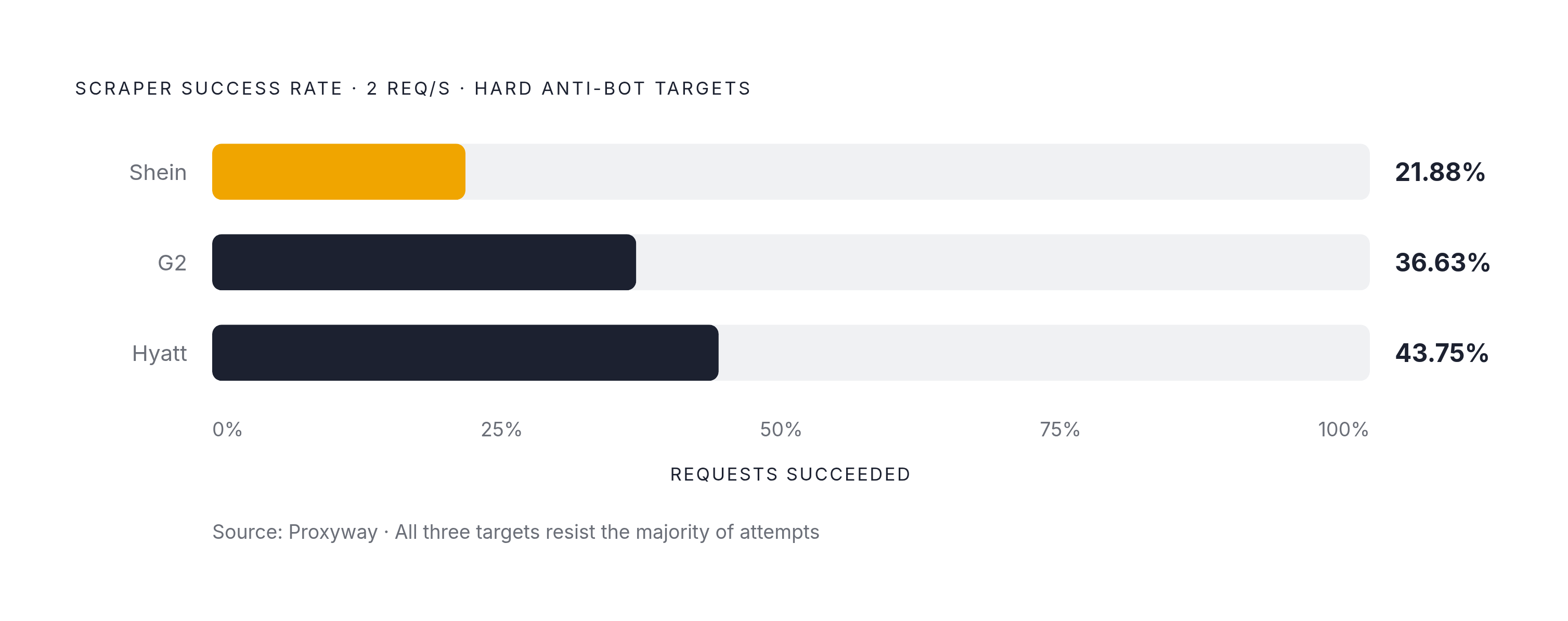
At two requests per second against genuinely hard targets, a Proxyway report found success rates of 21.88% on Shein, 36.63% on G2, and 43.75% on Hyatt. Those numbers matter because they set realistic expectations.
Proxy strategy scales with target difficulty. Running from a stable IP with a properly matched TLS fingerprint covers most of the open web just fine. Datacenter proxies spread out rate limits. Mobile proxies are the last resort, reserved for the hardest targets out there.
One policy shift deserves its own paragraph because it changes the map. Starting September 15, 2026, Cloudflare blocks mixed-use AI crawlers on ad-supported pages by default. That's not a minor technical footnote. Any RAG pipeline or AI agent crawling the open web runs straight into it, and it means compliance and routing decisions now sit right next to the technical ones. Residential proxies rely on reputation-based blocking, with Bright Data's network spanning 400M+ real residential IPs across 195 countries as a scale reference. Even with rendering and detection handled, raw browser output is not AI-ready, and the next section covers what extraction must produce.
The timing logic behind "waiting for render" in code
Even with a browser running and detection handled, there's still a timing problem nobody escapes: knowing when the page is actually done.
The lazy fix is a fixed wait, tell the script to pause for three seconds and hope for the best. That's fine for debugging at your desk. It has no business running in production, because it either wastes time waiting for nothing or gives up before the content actually shows up.
Four scenarios break even careful selector-based waits. Lazy-loaded content means the element appears in the DOM before its data has actually populated it, so the selector exists but the content behind it doesn't. Infinite scroll injects new elements dynamically, so a single wait only ever catches the first batch that loaded. Post-load API calls mean the element sits there empty until a follow-up fetch request finishes filling it in. And code splitting means the render logic for a given chunk hasn't loaded yet, so the selector you're waiting for might not exist at all until later.
The unavoidable consequence: site-specific wait logic ends up baked into most DIY scrapers, one site at a time, by trial and error. Managed APIs that handle this internally take that entire headache off the table for whoever's calling them.
Some sites keep persistent WebSocket connections open indefinitely, which means the page never technically goes idle, and a script waiting on that signal will just sit there forever Scraping Dynamic JavaScript Websites: Techniques & Fixes. The correct approach is to wait for a specific selector to appear in the DOM, which confirms that the JS responsible for that element has executed. Once the page is genuinely rendered, the next challenge is turning its content into something an AI system can actually use.
Turning rendered page output into structured, AI-ready data
Say the render finally lands clean. The page is fully loaded, every selector populated, timing handled. The output is still, technically, a mess.
Raw HTML pulled straight from a rendered browser comes stuffed with navigation menus, ad containers, script tags, and boilerplate that has nothing to do with the actual content. Feed that directly into a language model and it burns through context-window tokens on garbage, which drags down answer quality.
Selector-based extraction and another strategy handle this differently, trading off in ways worth knowing before picking one. Selector-based extraction uses CSS or XPath rules tuned to a specific site's markup. It's fast and precise, right up until the site changes its layout, runs an A/B test, or ships a seasonal redesign, at which point it breaks silently and nobody notices until the data looks wrong. AI-powered semantic extraction flips the approach: a language model reads the rendered content itself, not the underlying markup, so a developer describes what they want and the model finds it regardless of how the DOM happens to be structured that week.
The maintenance math here is brutal for the selector-based camp. Under the traditional model, teams spent roughly 20% of their time building scrapers and the other 80% maintaining them, according to a Kadoa estimate. That ratio is exactly backwards from where anyone wants to spend engineering time.
Self-healing scrapers built on LLMs flip that ratio back. They detect layout changes as they happen and re-map extraction logic automatically, no manual patch required. That's the difference between a scraper that needs a babysitter and one that mostly looks after itself.
Once extraction is done, there's still a format decision to make. Markdown keeps headings, lists, tables, and code blocks intact while stripping out nav bars and script junk, which makes it the natural fit for RAG retrieval. JSON is better suited for typed fields, price, title, spec sheet, star rating, where an application needs to query structured records directly. Most pipelines end up producing both: Markdown for retrieval context, JSON for indexed fields.
Clean, structured data a model can read without another parsing pass standing in the way is the target worth aiming for, even if it's hard to build. That's the actual line between a scraper doing infrastructure work and a system doing AI work.
Choosing the right stack for a JS rendering pipeline at different scales
None of this needs to get complicated if the decision starts with the target site, not with whatever tool happens to be trendy. Launching a full browser for a page that would've rendered fine over plain HTTP is wasted compute.
A practical way to sort it: if the content already sits in the initial HTML, or is available through a direct API call, skip the browser entirely and reach for a plain HTTP client paired with an HTML parser. And if the output is feeding an AI pipeline, a RAG system, or an agent, the strongest option is a unified API that returns Markdown or JSON directly, folding rendering, extraction, and formatting into a single call.
Scale changes the math, too. Self-hosting only wins out at genuinely enormous volume, millions of pages a day, where the fixed cost of running infrastructure finally undercuts what a managed platform would charge per request. Below that line, managed platforms come out ahead on total cost, most of the time, without much debate.
The Cloudflare policy taking effect September 15, 2026 adds a wrinkle that's easy to overlook until it isn't: AI pipeline builders now need a data partner that actively manages compliance and routing, not just one that controls a browser well.
Step back far enough, and the framing gets simple. The scraping layer was never the product. It's the supply chain feeding the product. Get that supply chain wrong, brittle selectors, flaky timing logic, a browser fleet nobody wants to maintain, and the AI layer built on top of it will sound confident while being quietly, consistently wrong. Web data APIs built specifically for AI pipelines, ones offering search, scraping, crawling, and structured output through a single interface, represent the practical endpoint of the build-versus-buy calculus for most AI engineering teams. The pitch isn't complicated: stop managing browsers, stop juggling proxies, stop hand-rolling format conversion, and put that time into the part of the product that actually earns the AI label. The right tool depends on what the target site actually requires (launching a browser when static HTML would suffice is waste, and not launching one when JS is required is failure). When content requires JS execution for a single site and the team has browser automation expertise, the choice is Playwright for new projects or Puppeteer for existing code, self-hosting only if volume justifies infrastructure investment. When content requires JS execution across many different sites, or the team wants to stay out of browser ops, the choice is a managed headless API or unified scraping API.