Google Dorks for Targeted Web Data Discovery
Learn how Google's search operators unlock publicly indexed data most people never find.

Google dorks are just Google's own search operators, pushed hard enough to force the engine into giving you exactly what you asked for instead of what it thinks you want. That's the whole trick, and the syntax tells Google "stop guessing and filter."
The origin story matters here, so bear with a quick detour. Security researchers in the early 2000s noticed that misconfigured servers, stray backup files, and exposed credentials all showed up in Google's index because someone forgot to lock a directory or set a robots.txt file. Johnny Long started collecting these queries and eventually built what became the Google Hacking Database, and that archive got handed off to Offensive Security. It still lives on today under Exploit-DB, quietly growing with every new misconfigured server on the internet.
Here's the reframe worth sitting with: dorking is a precision querying discipline that happens to have been discovered by people looking for other people's mistakes. The exact same operator logic that finds an exposed.env file also finds a public dataset, a competitor's pricing PDF, or a government report buried four pages into a results page. Google already indexed the entire visible web, and operators just let you cut through that index with something closer to a scalpel than a shovel.
One caveat before diving in: Google has quietly retired operators over the years, and the cache: operator disappeared in 2024, which stung anyone doing OSINT work that leaned on cached snapshots. Knowing what still works matters as much as knowing what used to.
The core operators every practitioner needs to know
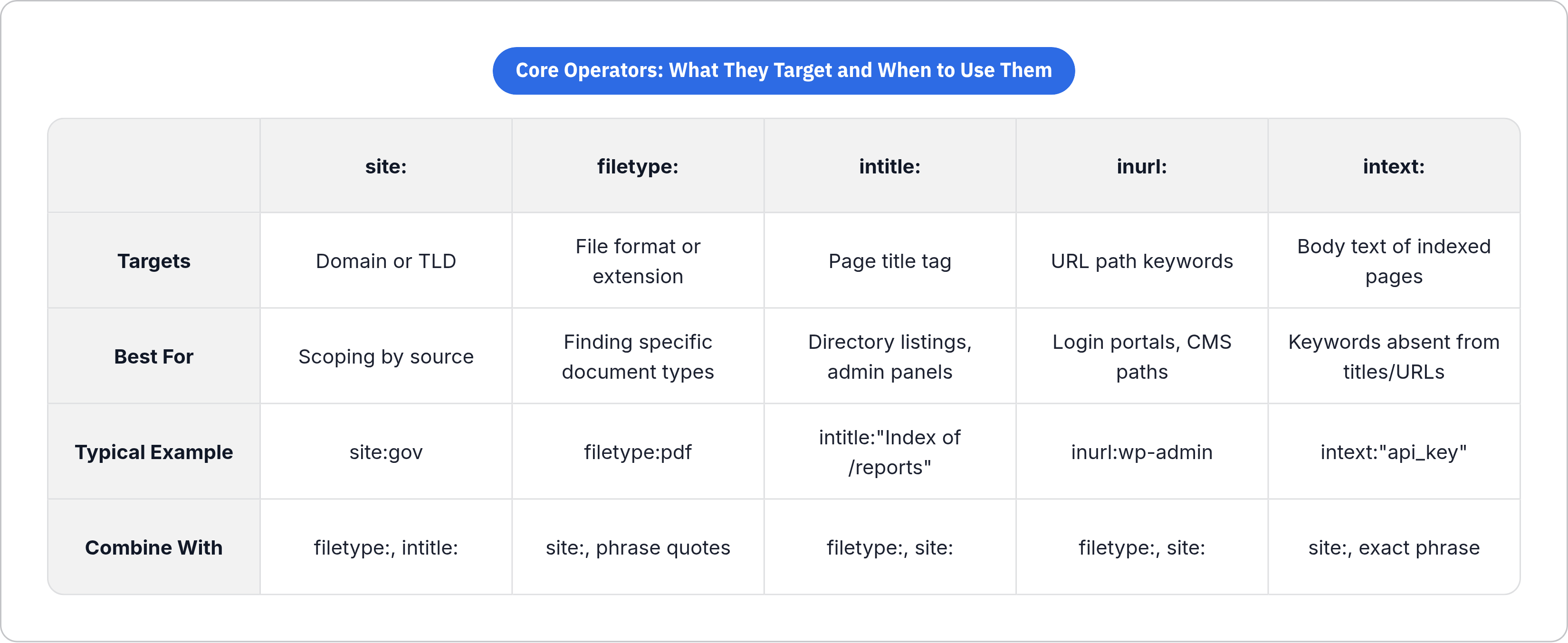
As of 2026, roughly two dozen operators still function reliably, and here's the working set, plus a reason to reach for each one.
site: restricts results to one domain or an entire top-level domain. site:gov pulls only government sources, while site:competitor.com scopes a search to a single company's public footprint. This is the operator you reach for first, almost every time, because it sets the boundary everything else works inside.
filetype: (or its cousin ext:) surfaces specific file formats, whether PDFs, CSVs, SQL dumps,.env files, or log files. If you know the shape of the document you want, this operator gets you there faster than any file browser ever could.
intitle: matches text that appears in a page's title tag. It's especially good at finding directory listings, admin panels, and report indexes, because those pages tend to have predictable, boring titles like "Index of /reports."
inurl: targets keywords sitting in the URL path itself. Useful for login portals, API endpoints, or CMS-specific paths like wp-content or wp-admin. If a system has a consistent URL structure, inurl: finds every instance of it across the web.
intext: searches the actual body text of indexed pages for a specific string. Less common than the others, but it's the one you use when the keyword you care about would never show up in a title or URL.
Exact phrase matching with quotation marks anchors a search to precise language instead of Google's fuzzy interpretation of what you probably meant, cutting noise dramatically.
Boolean operators (AND, OR written as |, and exclusion with a minus sign) are the glue that lets you chain everything above into a single compound query instead of five separate searches.
Worth knowing what's gone: cache: was removed in 2024, related: disappeared in 2023, and info:/id: was phased out back in 2017. Don't build a workflow around any of these, since they're not coming back.
The real precision comes from stacking. One operator is a filter, while a chain of three or four is a targeted query that does in one search what used to take an afternoon of clicking through results.
How operator combinations produce targeted queries — pattern by pattern
Each operator you add doesn't just narrow results, it narrows them multiplicatively. Three operators stacked together can take a query from millions of loosely related pages down to a few dozen that actually matter, and that's a meaningful part of the value proposition of dorking.
A few patterns come up again and again:
Domain + filetype. site:example.com filetype:pdf finds every indexed PDF on a single domain. Great for pulling public reports, whitepapers, or documentation without digging through a company's own site navigation.
Domain + filetype + phrase. site:example.com filetype:pdf "annual report" narrows further, down to a specific document type on a specific topic.
Filetype + keyword, no domain restriction. filetype:csv "survey results" finds publicly available datasets wherever they live, not just on one site.
Title + filetype for formal documents. intitle:"Annual Report" filetype:pdf surfaces structured reports across many organizations at once, since these documents tend to use predictable titles.
URL structure + filetype. inurl:"wp-content/plugins/" filetype:log combines a known path pattern with a file extension to find application-specific files that share a common structure.
OR chains across related filetypes. filetype:log | filetype:sql | filetype:txt broadens a single query across formats that tend to show up together, without running three separate searches.
Exclusion to cut noise. Adding -site:gov -site:mil or -signup strips out entire categories of irrelevant results in one move.
The goal of all this stacking is making every single result count, with precision valued over recall every time. Think of it in layers: a base scope (domain or topic), a structural filter (filetype or URL pattern), a content keyword, and an exclusion layer to clean up whatever's left. Build queries in that order and the process becomes repeatable instead of improvised.
One practical note: Google rate-limits aggressively, and firing off complex dorks in rapid automated bursts through the search UI gets you CAPTCHAs fast. Deliberate, spaced-out queries work well; rapid-fire scripted ones struggle, at least through the browser.
The Google Hacking Database as a reusable query library
The GHDB has run since 2004 and now holds thousands of catalogued dorks, organized into categories anyone can search. It's public and free, which is honestly a little wild given how useful it is.
What's actually inside is queries, plain and simple, that reveal what Google already indexed, documenting human error at internet scale. Someone, somewhere, forgot to protect a directory, and the GHDB remembers.
The fourteen categories cover a range of query types that practitioners can search by keyword or browse directly. Plenty of these categories matter well outside security auditing. A category built for finding exposed admin panels also teaches you the URL patterns CMS platforms use, which is useful even if you're not looking for anything to break into.
Using it is simple: search by category or keyword, find a pattern close to what you need, adapt it to your own domain or filetype target. It compresses years of trial-and-error into something searchable in thirty seconds.
The GHDB was built for manual lookup, one query at a time, by a human sitting at a browser. The real leverage shows up when you stop doing that and start running these queries programmatically instead.
Data discovery use cases that go well beyond security research
Public dataset discovery. filetype:csv "survey results" or filetype:json "open data" finds structured data published in the open, no data portal login required.
Academic and report mining. intitle:"Annual Report" filetype:pdf or intitle:"technical report" filetype:pdf site:edu surfaces institutional documents worth pulling into a research corpus.
Competitive intelligence. site:competitor.com "pricing" or site:competitor.com filetype:pdf maps out publicly available strategic material, no scraping behind a login wall needed.
Self-auditing. filetype:pdf site:example.com confidential is how organizations catch their own accidentally indexed sensitive files before someone else does, a slightly humbling exercise when running it on your own domain for the first time.
Domain-scoped corpus building. Pulling every indexed page of a certain type from a.gov or.edu domain works well as a way to seed a training or retrieval dataset.
The thread connecting all of these: dorking filters at the index level, before a single HTTP request gets made. Google does the filtering, which means less wasted compute downstream and fewer garbage pages to throw away later. For an AI pipeline, a dork can act as the query layer of a retrieval step. Instead of crawling broadly and sorting the mess afterward, you query narrowly and only retrieve what already matches.
How AI tools are changing the way dorks get written and executed
Between 2024 and 2026, a batch of LLM-based tools showed up that take a plain-language description of what you want and spit out an optimized operator chain. DorkGPT is one notable example of this pattern.
The effect is real: people who never memorized operator syntax can now describe a goal in normal sentences and get back a structured query. That lowers the floor, though it doesn't raise the ceiling much. AI-generated dorks tend to land on generic, safe patterns. When you're chasing something specific, a target with an unusual URL structure or an oddly named filetype, a manually built operator chain still beats a prompt-generated one most of the time.
Dorking is also fusing into bigger OSINT frameworks. Tools like Maltego and SpiderFoot now treat dorking as one step inside a larger automated pipeline, not a standalone activity you do in a browser tab. Dorking is turning into a node in a graph instead of a session you sit down and run.
Worth knowing what's out there for automated execution:
Pagodo runs GHDB dorks programmatically at scale, in Python. theHarvester pairs Google dorking with other sources to pull emails and subdomains, while recon-ng offers a full reconnaissance framework with Google Search modules built in. GoogD0rker and GDA (Google Dork Automation) scrape results and automate the OSINT grunt work that used to eat an analyst's afternoon.
And operator behavior inside AI search interfaces is a mixed bag right now. ChatGPT Search accepts site: in a prompt but has no formal documentation on operator support. Google's AI Mode and AI Overviews seem to respect operators like site: at the retrieval layer, though the AI-written summary on top of those results might not actually honor the constraint. Microsoft's Copilot Search, launched in April 2025, runs on Bing under the hood, so Bing's own operator logic shapes what it retrieves.
The direction is clear enough: dorking is moving from a manual research skill into a parameterized step inside agent loops that run without a human clicking anything.
Connecting dork output to AI pipelines through a web search API
A dork alone gets you a page of blue links in a browser. An AI pipeline needs structured data: title, URL, snippet, and often the full cleaned page content, delivered as JSON or Markdown, not as HTML rendered for human eyes.
That's the gap a web search API closes. It accepts the same operator-enriched query string you'd type into Google, runs it against the index, and hands back structured results without a browser session and without fighting a CAPTCHA every fifty requests.
A basic pipeline looks like this:
- Build the dork, either by hand or through an LLM prompt
- Send it to a search API that actually supports operator syntax
- Get back structured results: URLs, titles, snippets
- For any URL that needs deeper content, call a scraping or crawling API to pull the cleaned page
- Feed the resulting Markdown or JSON into an LLM's context window, a RAG retrieval layer, or an agent's memory
This matters more than it sounds like it should, since research on agentic retrieval shows systems that run iterative search-reason-search loops outperform single broad-keyword searches by a wide margin. Dork-precise queries at each loop keep the retrieved context tight instead of bloated with half-relevant filler.
One more thing worth being blunt about: raw HTML is a poor format to hand an LLM at step four. Scripts, nav bars, ad slots, and boilerplate footer text inflate token counts and add noise nobody asked for. The extraction layer should hand back semantic content. Cleaned Markdown keeps structure with low overhead, while JSON-schema extraction makes sense when you need typed fields, things like price, author, date, or SKU, pulled out cleanly rather than buried in prose.
Where dorking breaks down and what to do about it
Rate limiting is the first wall everyone hits. Run dorks in rapid automated sequences through a browser and Google throws CAPTCHAs, then temporary blocks. This is exactly why running queries through an API layer matters at scale: it's how the workflow survives past a handful of requests.
Index coverage is another limit people forget about. Google indexes what it can reach and chooses to rank, nothing more. JavaScript-heavy pages, anything behind a login, and content published an hour ago may not show up at all. Dorking surfaces what's indexed, but it says nothing about what exists.
Operators drift too, and Google doesn't send a memo when it happens. cache: vanished in 2024, breaking workflows that had quietly depended on it for years. Any pipeline built around a specific operator needs a fallback plan, because that operator might just stop working one day with no warning.
Result sets shift under you as well. Google's index updates constantly, so a query returning a clean, consistent dataset today might return something different next week. If reproducibility matters for your use case, snapshot the results rather than re-querying and assuming you'll get the same thing back.
There's also a specificity trap. Chain too many operators together and you can miss relevant results that don't match your exact pattern by one small detail. Sometimes a broader dork followed by filtering downstream beats a maximally narrow one that's technically more "precise" but misses real matches.
On the legal and ethical side: dorking only surfaces what's already publicly indexed. The real question isn't whether you can access something, it's whether you have a legitimate reason to be pulling that data in the first place. That's a data governance question, and no operator chain answers it for you.
Building a repeatable dorking workflow for ongoing data collection
A one-off dork is just a search, while a catalogued, versioned set of dorks running on a schedule is a monitoring system, and that difference is bigger than it sounds.
Worth building and actually maintaining:
A personal or team library of dorks, organized by use case (competitor monitoring, dataset discovery, domain auditing), with notes on what each query reliably turns up over time. A change log too: when an operator breaks or results quietly degrade, write it down, since silent pipeline failures are the worst kind, because nothing looks broken until the data quality does.
Beyond that, scheduled execution matters. Run key dorks daily or weekly through a search API and diff each run against the last one to catch newly indexed content as it appears. Store URLs and snippets from every run, and skip anything already processed so the pipeline isn't reprocessing the same page for the tenth time. Then, for anything flagged as new or changed, trigger a scraping call to pull the cleaned content for whatever comes next downstream.
None of this is complicated on its own. What makes it work is treating dorking as infrastructure rather than an occasional search technique, something that runs quietly in the background and tells you when the web changes in ways you actually care about.