CSS Selector Strategies for Reliable Web Extraction
How to anchor CSS selectors to signals that survive site redesigns.

A scraper runs fine Monday. By Friday, it's pulling empty rows or garbage values, and nothing in the logs says why. No red error, no crash. Just quietly wrong data, sitting in a database like nothing happened. That's the most common failure mode in production web extraction, and it's a bigger problem than bot detection or network timeouts because nobody notices it until someone downstream asks why the numbers look weird.
The mechanism behind it is almost always the same. A selector gets tied to an auto-generated class name or a long, nested layout path, and the moment a site updates its front end, that path changes. No exception gets thrown. The scraper just quietly returns the wrong thing, or nothing at all, and keeps going. Selector healing tools exist to patch this automatically, but BuildMVPFast found they only cover 28% of real-world test failures, so most of this breakage sits there unaddressed until a human finds it.
This is worse than a crash, not better. A crash stops the pipeline cold and somebody gets paged. A silent wrong-value failure keeps running, feeding bad data into whatever depends on it, for as long as it takes someone to notice the output looks off.
The pace of this is picking up, too. Sites built with CSS-in-JS frameworks generate class names like .sc-bdVXAO at runtime, and those names shift every time the underlying styles change. A selector anchored to one of those has a shelf life measured in weeks, not years.
The stakes get sharper once the scraped data feeds a language model. A model's capacity to reason coherently over what it got is what's at stake. A broken extraction fed into an LLM pipeline produces no choke and no error. It'll produce a fluent, confident, completely wrong answer, because the model has no way to know the input was garbage to begin with.
CSS selectors in a scraping pipeline
CSS selectors don't belong to the front-end team here. For a scraper, a selector is the query language for HTML, the exact mechanism that turns a raw server response into structured data.
The pipeline runs in a predictable sequence: an HTTP request goes out, raw HTML comes back, that HTML gets parsed into a DOM tree, a CSS selector targets specific elements in that tree, and the matched content gets pulled out as text, attributes, or nested structure before landing in JSON, a CSV, or a database. Selectors don't operate on raw text. They operate on the parsed tree. Grepping for a string or running a regex against the HTML is a weaker approach than querying the structured DOM.
CSS selectors only see HTML that exists at parse time. If a page loads its data after the fact through JavaScript, the selector has nothing to grab until a headless browser tool like Playwright or Puppeteer renders the page first. If that step is skipped, the selector isn't broken; it's just looking at an empty stage before the actors walk on.
The workflow that keeps this sane in practice: open DevTools on the target page, test candidate selectors live with document.querySelectorAll() in the console, and only move a selector into the actual scraper once it's proven itself in the browser. That one habit catches most mistakes before they ever become production bugs.
Selector quality gets judged on three things in a live system: whether it matches only the right element (reliability), whether the next developer can read it and understand what it's grabbing (maintainability), and whether it's a direct, cheap lookup instead of an expensive walk across a bloated tree (efficiency). Everything in the rest of this guide is really just different ways of optimizing for those three things.
The selector stability hierarchy: which signals survive site updates
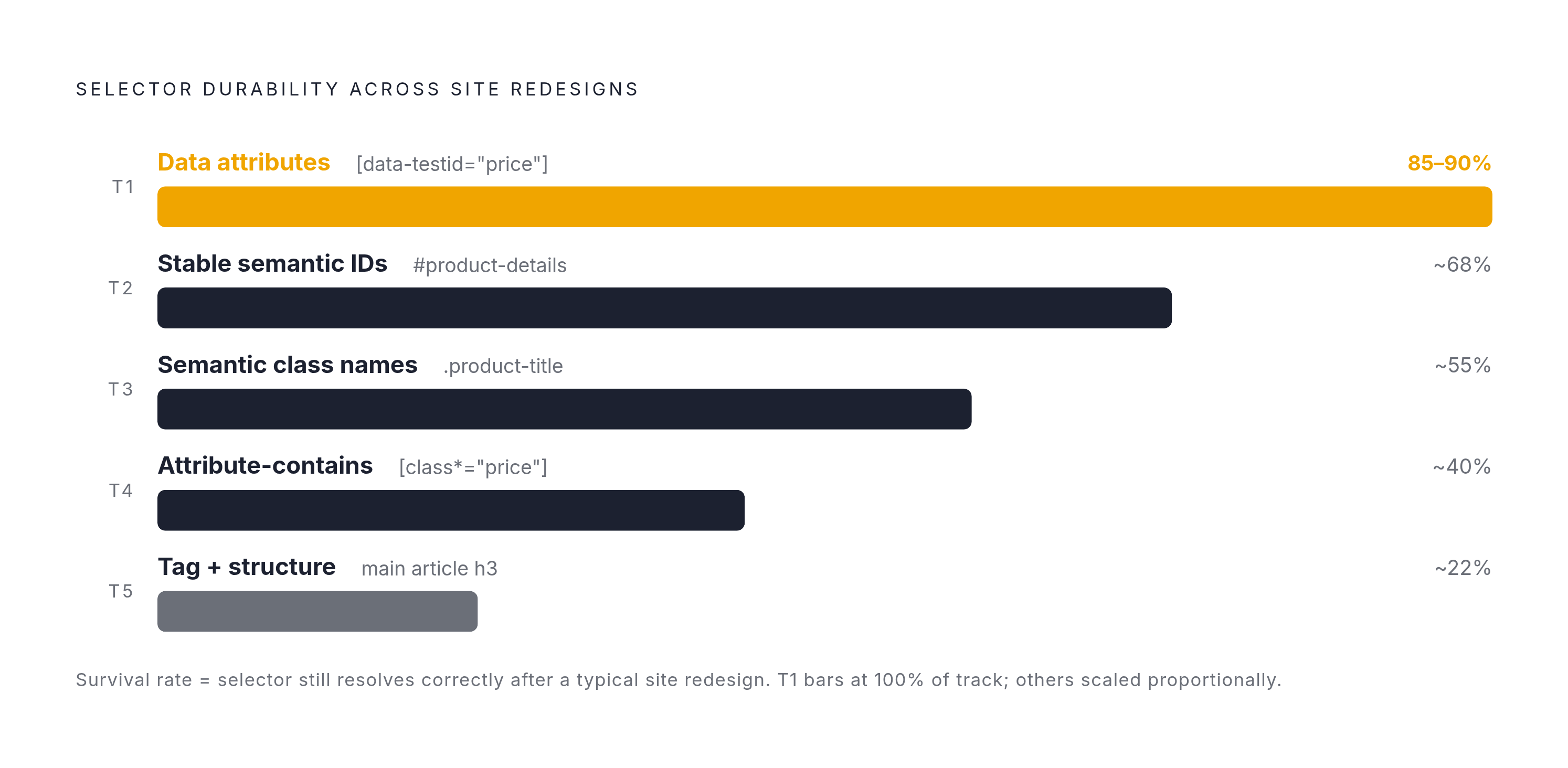
The central decision in writing a durable selector is which signal to anchor to, and some signals survive redesigns while others don't last the month. Treat this as a habit: start at the top tier, and only drop down a level when that signal isn't available on the page.
Tier 1 is data attributes: things like [data-testid="price"], [data-qa="add-to-cart"], or [data-product-id]. These exist because a developer put them there on purpose, usually for testing, and they almost never get renamed or removed in a redesign because they're not tied to how anything looks. QA teams depend on these attributes to keep their own test suites from breaking, so the cost of removing one is high enough that most teams just don't. QASkills' 2026 analysis found self-healing selectors still succeed on attribute changes 85 to 90% of the time, which tracks with how rarely these attributes get touched in the first place. An exact match like [data-testid="product-title"] is about as durable as a selector gets, because it names both the attribute and the value it expects.
Tier 2 is stable IDs: #product-details, #reviews-container. IDs are unique per page and fast to look up, but only when they describe content instead of being auto-generated. #react-root-7a3b2c is just a hashed class wearing a different hat, and it'll break just as fast.
Tier 3 is semantic class names like .product-title or .price-current. A class name that describes what something is tends to outlive a visual redesign, because redesigns change how things look, not what they're called in the markup. This tier gets considerably stronger with contextual anchoring: .product-card.price-current holds up better than .price-current alone, because scoping the match to a known region of the page protects against that same class getting reused somewhere else entirely.
Tier 4 is attribute-contains patterns, like [class*="price"]. This is the pattern built specifically to survive CSS-in-JS hashing. [class*="price"] will still match price_a1b2c3 no matter what random suffix gets tacked on. That same loose match also grabs price-discount, old-price, and my-pricing-table, making it a tool for when nothing more specific is available.
Tier 5 is tag-plus-structure selectors, something like main article h3. Treat this as a last resort. Structural relationships shift the moment a layout changes, which makes this tier the most fragile one on the list.
Two structural patterns that break selectors faster than site redesigns
Picking the right tier of signal solves half the problem. Two habits undo that work even when the underlying signal was solid.
The first is chaining selectors too deep. Something like div.container > div.row > div.col-md-8 > div.card > div.card-body > h5.card-title encodes every wrapper div between the top of the page and the target, and the moment a front-end refactor adds or removes just one of those wrappers, the whole chain stops matching. The fix is to shorten it to the stable endpoint plus one reliable ancestor: .card-body .card-title does the same job without depending on every intermediate div staying exactly where it was.
Part of that fix is choosing the right combinator. The descendant combinator (a plain space) is generally safer than the child combinator (>) in anything with real depth, because > demands an exact parent-child relationship, while a space allows any amount of nesting in between. A space is forgiving of the refactor that inserts one more div. A > is not.
The second habit is reaching for :nth-child() in places where position doesn't actually mean anything. That pseudo-class is built for ordered data, things like table rows or ranked lists, and it's a reasonable choice there. Dropping it into a layout-driven section of a page means a design tweak that shifts child order will quietly point the selector at the wrong element. That's a worse outcome than returning nothing, because nothing throws an alarm and a wrong value doesn't.
There's a clean test for when a positional selector is legitimate: table.results tbody tr:nth-child(n+2) td is stable because a table's row order is the data's order. The second row is always the second record, full stop on that logic. In that same vein, :nth-of-type() holds up a little better than :nth-child() in a mixed-tag context, since it only counts siblings of the matching tag and ignores everything else nearby, though the same caution about layout dependence still applies.
Both mistakes trace back to the same root cause: the selector is describing layout, not content. Fix either one the same way, by finding a stable, semantic anchor closer to the actual target.
CSS selectors versus XPath
CSS selectors and XPath aren't rivals fighting for the same job.
The default should be CSS for most extraction work. It's shorter, easier to read, and handles the bulk of page structures without needing anything fancier. Reach for XPath when the task needs something CSS genuinely cannot do: walking upward to a parent element, matching on visible text content, or expressing something like "find the div that contains a span with the text 'Price'".
Readability tends to favor CSS even when both options are on the table. .product-title says the same thing as //div[@class='product-title'], with a fraction of the characters and none of the bracket-heavy syntax to parse. For quick lookups, that's a real maintainability win for whoever reads the code next.
Performance leans toward CSS in one specific context and toward XPath in another. Inside browser automation tools like Playwright, Puppeteer, or Selenium, CSS selectors talk to the JavaScript engine directly, making them the natural fit for clicking buttons, filling out forms, and working through pagination, and they run roughly 23% faster than the equivalent XPath expression in that setting. Inside server-side parsers and frameworks like Scrapy or lxml, the balance shifts: XPath's ability to match on text and climb upward through the tree often justifies the extra typing for data extraction work.
None of this requires picking a side for an entire codebase. BeautifulSoup, lxml, Scrapy, Playwright, and Cheerio all support both syntaxes, so switching between them is a per-query decision with zero migration cost. The simplest version of the rule: if a clean, stable selector is sitting right there in the element inspector, use CSS. If the structure demands climbing upward or matching on text, bring in XPath.
The selector type reference: the full grammar for extraction work
Knowing the full grammar matters less as trivia and more as a toolkit. Once a developer knows every pattern available, picking the most durable option for whatever a given page offers becomes a matter of matching the pattern to the signal, not guessing.
Attribute selectors do extraction-relevant work. [data-price] matches any element carrying that attribute regardless of its value, which is handy when the presence of the attribute alone tells you what kind of element you're looking at. [data-testid="product-title"] is the exact-match form that sits at the top of the stability hierarchy, naming both the attribute and the value together. [href^="/product"] matches link URLs by their starting pattern, and it holds up well because URL structure tends to change less often than class names do. [href$=".pdf"] does the same thing for file endings, which is reliable for targeting downloadable content. [class*="price"] is the CSS-in-JS survival pattern, catching any hashed variant of a known class fragment regardless of the random suffix tacked onto it. [class~="featured"] matches a class as a distinct word inside a space-separated list, which avoids the false positives that a looser partial match would pick up.
Combinator selectors describe relationships between elements without hard-coding the layout between them. The descendant combinator, a plain space as in .product-card .price, matches anywhere inside that container regardless of how many layers of nesting sit in between, making it the default workhorse for contextual anchoring. The child combinator, >, as in ul > li, restricts the match to direct children only, which is useful when intermediate nesting would otherwise pull in false matches, though it's worth avoiding in anything deeply nested where a new wrapper div could slip in unnoticed. The adjacent sibling combinator, +, as in h2 + p, grabs the element immediately following another, useful for content that always sits right after a labeled heading. The general sibling combinator, ~, as in h2 ~ p, grabs every sibling that follows, which is the better choice when the number of elements between the anchor and the target isn't fixed.
Pseudo-class selectors handle positional and structural filtering. :first-child and :last-child are stable choices anywhere position carries actual data meaning, like the first search result or the last item in a list. :nth-child(n) and :nth-of-type(n) are the right call for tables and ranked lists, and the wrong call for anything laid out visually, for the reasons already covered above. :not(.ad) filters out known noise elements, a pattern that earns its keep on any page mixing editorial content with promotional blocks. :empty catches placeholder cells before they get mistaken for real data. Selectors Level 4 added a newer set of tools to this list, including :has() and :is(), which extend what a single selector can express without needing a second query to follow up on the first.
None of these forms is inherently better than another in the abstract. This whole guide keeps coming back to one question: does this selector point at something a developer put there on purpose, or does it point at something that just happens to be true about the page today. Anchor to the first kind whenever it's available, and a scraper that works on Monday has a real shot at still working on Friday.