Building a Custom MCP Server From Scratch
Learn how to structure tools and resources to build web-data servers that work with any AI client.

A custom MCP server is how you give an AI agent live, structured web data (search results, scraped pages, change alerts) without the agent managing a browser, a scraper, or a pile of API keys. Olostep is one option for the data layer underneath that kind of server, since it handles search, scraping, crawling, and monitoring through a single API with output already shaped for a model to read. This piece walks through the actual build: what an MCP server exposes, what to build first, and how to wire up tools for search, scrape, and monitor jobs.
Building a Custom MCP Server Is a Tractable Developer Task
MCP is the shared connector between AI clients and outside tools now, so a server built once works with any client that speaks the protocol, no custom code required per app. Anthropic put it out in November 2024, and by spring 2025 OpenAI, Microsoft, and Google had all picked it up, with Claude Code, Cursor, and most other AI coding tools following along. It's gone from a new idea to plumbing everyone just assumes is there.
The comparison people reach for is USB-C, and it holds up. Write a server once against the spec, and any client that follows the same spec can find it and call it at runtime, no custom wiring needed. Compare that to the old way: a separate tool wrapper for every endpoint, for every model vendor, where each new model version or new agent framework breaks something that used to work. MCP takes that whole tangle and folds it into the protocol, so the integration work happens once instead of every time something upstream changes.
What an MCP server actually exposes and how the pieces fit together
An MCP server works with three building blocks (tools, resources, and prompts) and a transport layer that sits apart from all three and decides whether the thing runs on your laptop or as a hosted service somewhere else. Tools are functions the AI client can run on its own, with a person's sign-off first; a weather app's get_forecast or a search function like search_web are typical examples. Resources are more like files the client can pull up when needed, things like an API response or a chunk of structured data, fetched only when the agent actually wants it instead of getting stuffed into every prompt whether it's needed or not. Prompts are ready-made, fill-in-the-blank templates stored on the server side. They show up least often in servers built around web data, but they're part of the spec, so it helps to know they exist.
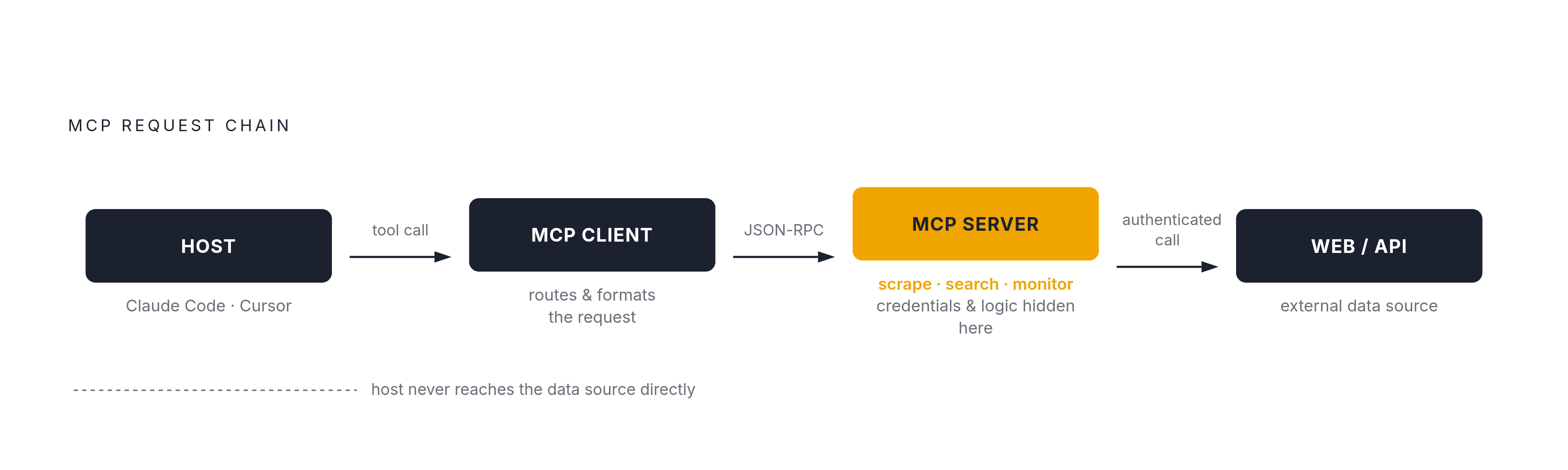
A request moves through a fixed path. The host app, Claude Code or Cursor or whatever you're running, never talks straight to the data source. It talks to an MCP client, which talks to the MCP server, which is the thing that actually calls the outside API or runs the scrape. That chain keeps the login credentials, the API calls, and the business logic all tucked behind a plain, consistent interface instead of scattered across the app.
Host (Claude Code, Cursor) → MCP Client → MCP Server → Web / APITransport is a separate question from any of that. Stdio works for local development, with the server running as a subprocess the host starts up directly. Streamable HTTP is for anything remote or hosted elsewhere. The 2025-03-26 spec update named Streamable HTTP the go-to choice for production use, and the 2026-07-28 update went further, making it stateless and formally dropping the older HTTP+SSE approach (more on what that stateless shift means for your tool design later on).
Every tool you build carries a name, a description, and a schema spelling out what input it expects. The model reads that description to decide whether a given tool fits the task at hand, so a vague one-liner leads to the model picking the wrong tool, or skipping the right one. Writing that description well is part of building the tool.
Identifying what your custom server should expose before writing any code
The ecosystem already has public servers covering the obvious, general needs: fetching a webpage, driving a browser, running a basic search. That means the servers actually worth building are the ones that handle something specific or proprietary that no public server already does. A unified web-data API like Olostep, built to handle search, scraping, crawling, and monitoring with output already shaped for a model to read, fits squarely into that gap, since no general-purpose public server bundles all four into one clean output.
Before any code gets written, the choice that matters most is what becomes a tool and what becomes a resource. Get that wrong and the server ends up as a thin shell around an API the agent could've called on its own, just with extra steps. The test: does the agent need to do something, or does it need to read something? Triggering a scrape, running a search, kicking off a monitor check, those are actions with consequences, so they're tools. A full crawl result, or a diff showing what changed on a page being watched, is a big chunk of structured data the agent dips into as needed, so that's a resource.
For a server focused on web data, start by naming the exact action involved: is the agent searching for pages, scraping one it already has the address for, crawling a whole site, or watching a URL for changes over time? Each of those is its own tool, with its own inputs and its own shape of answer coming back. The gaps actually worth filling are pulling structured data out of a specific kind of site, scraping something that sits behind a login, building a monitoring pipeline to track a competitor, processing a batch of URLs at once, and search that comes back as clean structured data instead of a pile of raw HTML. Whether the job calls for handling bot-detection, processing URLs in batches, or returning clean Markdown versus JSON will decide whether the finished server is a glorified wrapper or something actually worth having.
Keep the first version small. Two to four tools, each with a sharp, specific job, beats a dozen half-explained ones, mostly because big, bloated tool schemas eat up context space before the user has even typed a question.
Scaffolding the project: environment, dependencies, and initial server file
Building in Python, start with uv. Run uv init <project-name>, then uv venv, activate it, then uv add "mcp[cli]" (or pin it with uv add "mcp[cli]==[2.0.0](https://modelcontextprotocol.io/docs/2026-07-28/develop/build-server)" if you need SDK 2.x for the 2026-07-28 protocol update). In SDK v2, the class to import is MCPServer, which lives in mcp.server.mcpserver, though mcp.server re-exports it too. If a tutorial has you importing from mcp.server.fastmcp, it's working off the older SDK, so check which protocol version any guide you're following actually supports before copying its code.
A bare-bones server file looks like this:
from mcp.server import MCPServer

mcp = MCPServer("your-server-name")
That's the whole thing to start. No tools registered yet, just a server with a name, wired to talk over stdio. It connects and sits there doing nothing, confirming the environment works before building anything on top of it.
TypeScript follows the same shape, just with different packages. SDK v2 splits what used to be one package, @modelcontextprotocol/sdk, into several: @modelcontextprotocol/server, @modelcontextprotocol/client, @modelcontextprotocol/core, plus optional adapters for whatever framework you're using (@modelcontextprotocol/node, express, fastify, hono). A tutorial still importing from the old single package is working off the version before the split. Install with npm install @modelcontextprotocol/server zod tsx, where tsx lets TypeScript run directly without a separate build step while you're developing. The starting file:
import { McpServer } from '@modelcontextprotocol/server';

const server = new McpServer({ name: 'your-server-name', version: '1.0.0' });
Once the server boots, add the API key as an environment variable, read with process.env.OLOSTEP_API_KEY in TypeScript or os.environ["OLOSTEP_API_KEY"] in Python, and have the server exit with a readable error if that key is missing. It's the same pattern plenty of reference projects use for a GitHub token: fail loud and early, so a missing key doesn't surface later as a confusing API error three layers down.
Defining tools that expose live web data: search, scrape, and monitor
A tool is only as good as the sum of its name, its description, and its schema, because together those three tell the model when to reach for it, what to hand it, and what kind of answer to expect back. For tools dealing in web data specifically, the format you choose for the return value, Markdown against plain JSON, has a real effect on how well the model can actually reason about what comes back.
The anatomy stays the same across every tool. Give it a short, verb-first name in snake_case, like search_web or scrape_url or check_page_change. Write a description of one or two sentences that gives the model what it needs to decide if this tool fits the job in front of it, and spend real time getting that description right, since a vague one is the single fastest way to get the wrong tool picked, or the right one skipped. Define the input with Zod in TypeScript or with Python type hints and a docstring; either SDK turns that straight into JSON Schema, and that same schema checks the arguments before your handler ever runs, so neither side needs to write its own validation by hand. The handler itself is just the async function that calls out to the actual API and hands back a structured result.
Three tools cover most of what a web-data server needs to do. The first, search_web, takes a query and an optional count, calls a search API such as Olostep's, and comes back with a clean list of title, URL, and snippet for each result as JSON, so the agent can work through the list without ever touching raw HTML. The second, scrape_url, takes a single URL, calls a scraping endpoint, and returns clean Markdown rather than the page's raw source, because Markdown uses far fewer tokens, drops the navigation bar and ad clutter, and lets the model read the actual content directly instead of picking through markup first. Raw HTML burns through context space with scripts, ads, and site navigation that tell the model nothing useful; that's why the field settled on Markdown as the default return format. When a page runs long, it's worth exposing that content as a Resource, addressable by its own URI, rather than cramming the whole thing into the tool's response, so the agent pulls only the part it actually needs instead of getting handed the entire document on every single call.
The third tool, monitor_url, takes a URL along with a plain description of whatever change should trigger a flag, registers that job with a monitoring endpoint such as Olostep's, and sends back a job handle, an ID string the agent holds onto. That handle becomes the thing the agent passes to a companion tool, something like get_monitor_result, whenever it wants to check in on whatever diffs have turned up. This isn't just a clean way to design it. The 2026-07-28 protocol update specifically recommends this exact pattern for anything stateful now that the protocol itself runs stateless: the server mints a handle, and the model just passes that handle back whenever it needs to check on the job.
In Python's SDK, wiring any of these up is a matter of decorating an async function with @mcp.tool(). The SDK reads straight from that function's type hints and docstring and builds the tool definition on its own, no separate schema file, no manual wiring between the function and what the model sees. Three tools, each doing one job well, is enough to turn an empty server into something an agent can actually put to work.