MCP Tool Design Best Practices
Reshape tool APIs for agents, not humans, to reduce failures.

An agent calling the wrong tool, or calling the right tool with the wrong arguments, is a pattern visible across developer forums, and the thread usually concludes that MCP itself is broken. How those tools got designed in the first place causes most agent failures, one layer up from where the forum threads look. Teams take an existing API, the same one built for human developers reading docs at their own pace, and expose it to an agent with barely a second thought. That instinct makes sense on paper: the API already works, so why not just point the agent at it and let it figure out the rest?
For a demo, that approach often holds up fine. Bloat causes confusion, confusion causes retries, retries cause more bloat. It's a feedback loop with no natural ceiling.
AWS's 2026 analysis of MCP tool design names this correctly as a context engineering problem: the fix isn't about the protocol layer, it's about shaping what the model sees and when it sees it. GitHub Copilot's team tested this directly. Block went through an even more dramatic version of the same lesson with its Linear MCP server, rebuilding it three separate times before landing on just 2 tools, down from more than 30.
Think of MCP the way you'd think of the iPhone's gesture language. An LLM doesn't get frustrated the way a person jabbing at an unresponsive button does, but it fails in an analogous way: it picks the wrong gesture, reaches for the wrong tool, because the design never accounted for how it actually perceives options.
Teams that insist their tools "work fine most of the time" are describing a mirage. Occasional success is what systematic fragility looks like from the outside, because wrong parameter values and missed tool selections are quiet failures. They don't throw an error, they just produce a slightly wrong answer, or trigger a retry nobody notices, and the rate at which that happens only climbs as the task in front of the agent gets more complicated.
How LLMs choose and invoke tools
An LLM doesn't look up a tool's behavior from some reference manual tucked away in storage. Understanding that single fact changes how you should think about every description, parameter name, and schema you write from here forward.
The mechanism agents run on is usually some version of the ReAct loop. The model produces a thought, picks a tool and fills in arguments, the runtime executes that call, and the result gets fed back into context for the next turn. That cycle repeats, and every iteration appends more text to a transcript that keeps growing. Nothing gets forgotten automatically. Tool definitions, in particular, load into context on every single call regardless of whether that tool ends up being used. They're not fetched on demand the way a function in a codebase might be; they sit in the model's working memory the entire time, consuming tokens whether or not they're relevant to the current question.
Modern tool calling returns a structured function call rather than loose text a developer has to parse out by hand, which makes the whole loop more dependable. But it also means the schema itself is something the model reads and reasons over directly, not a formality the runtime handles invisibly. A messy schema is a messy instruction.
Selection quality degrades for predictable reasons: tools that look semantically similar to each other, too many options competing for the same decision, names that don't clearly signal what a tool does. The Capability Square framework is a useful way to keep the responsibilities straight: every tool call involves the LLM (handling language and reasoning), the MCP server (handling symbolic computation and data access), the business analyst who designs the tool ahead of time, and the business user who invokes it later. Collapsing these roles, say, asking the model to do math it should delegate to the server, or asking the server to interpret ambiguous human phrasing, is where mismatches creep into the system. Good tool design pushes domain knowledge into the description and pushes computation into the server, leaving the model to do only what it's actually good at.
None of this holds together without active context management.
Writing tool descriptions that guide selection
A tool description functions as the specification the model reasons from, not a courtesy explanation bolted on for human readers skimming the code. Most descriptions shipped today don't meet that bar. They read like comments left for the next engineer, not instructions written for the party that will actually be making decisions off them.
A research-backed rubric breaks a solid description into six parts. Purpose states what the tool does. Guidelines explain when and how to use it, which prevents the model from firing the tool at the wrong moment in a workflow. Length means enough detail to be useful without turning into a wall of text the model has to wade through on every single call. Examples give concrete usage scenarios to anchor the abstract parts of the description in something real.
That last component turns out to be the most negotiable. The other five components earn their keep. Examples are the one you can trim first when space runs tight.
Clarity in parameter values pays off disproportionately. The fix costs almost nothing: name things the way a person would describe them out loud, not the way a database schema happened to settle on them years ago.
Error messages belong to the description contract just as much as the parameter list does. A message reading "search requires 2 or more terms in query" tells the model precisely what to change on the next attempt. A message reading "no results" tells it nothing, and the model is left to either give up or guess blindly at a fix, burning another round trip either way.
AWS's own analysis points out the tension here directly: enriching a description with clearer value mappings and usage examples does help reduce confusion, but every addition also adds tokens, which risks worsening the very bloat that the fix was meant to solve. Balancing those two forces is a genuine trade-off, not a box to check once and forget. A vague or tampered description can steer an agent toward unsafe behavior just as effectively as a misconfigured permission setting can, because the model is trusting the description to tell it the truth about what a tool does, which makes this a security risk, not just a usability one.
Schema constraints as a precision tool the description alone cannot provide
Descriptions guide a model toward the right answer. Schemas can remove the guessing entirely, at least for any input with a finite set of valid values, and the schema often ends up being the more dependable of the two mechanisms because it leaves less room for interpretation.
Enums are the clearest example. UX research settled this question decades ago under the name Recognition over Recall: people make fewer errors picking from a visible list than pulling an answer from memory, and the same holds for a model reasoning over a schema.
Default values do similar work for parameters that are almost always set the same way. A field the model can't reason about correctly isn't neutral, it's actively worse than not having the field at all, because it invites a wrong value where silence would have invited none.
Naming matters here in the same way it mattered for descriptions. Parameters should match how the model understands the domain, not whatever label a database column happened to inherit. If a field is called id but actually requires a UUID, the name is making a promise the field doesn't keep, and that broken affordance is exactly the kind of thing that trips up a model mid-call. Tools that batch-process URLs or hand back structured data payloads, the kind of thing a web-data API built for AI agents has to do constantly, need this discipline more than most, because every field in that definition is sitting in context before a single request goes out, and each one has to justify its own token cost.
Input validation inside the tool adds a second layer on top of all this. Catch bad input before it reaches an external system, and hand back a structured error the agent can act on, rather than letting a malformed request travel all the way out and come back as a raw 500 from someone else's server. The agent can work with a clear error message naming the specific field and what's wrong with it. It can't work with a stack trace.
Keeping tool counts within the range where LLMs can reason well
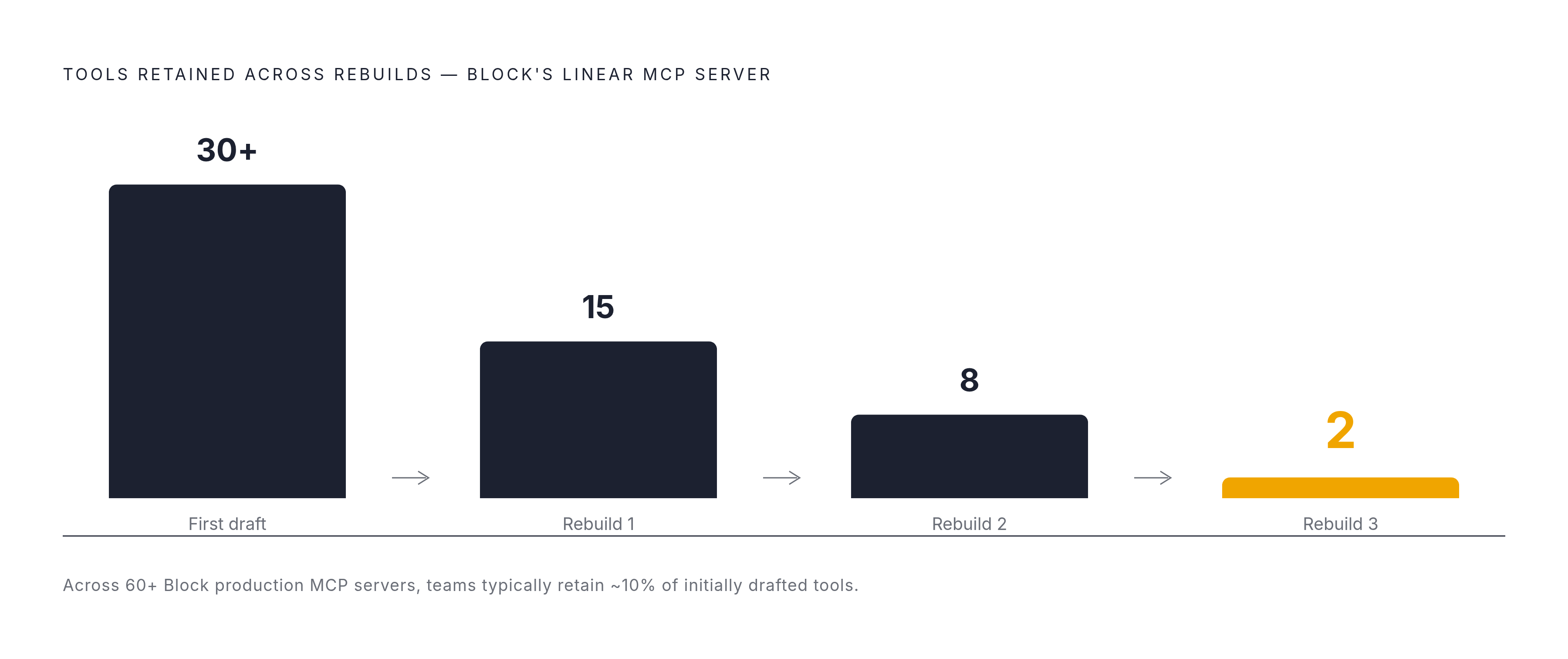
Block's Linear server tells the whole story in miniature. The team built it, found it unwieldy, tore it down and rebuilt it, did that twice more, and landed on 2 tools, down from an original set of more than 30. A company concluding, after three attempts, that nearly every tool it had originally built was actively getting in the model's way is not a minor trim.
Performance doesn't decline smoothly as tool count rises. A typical multi-server MCP setup can eat a large share of a model's entire context window just loading tool definitions, before the agent has done a shred of actual work for the user. That budget doesn't replenish. Every token spent on a definition is a token not available for the task itself.
The workable range in practice runs from a handful of tools up to around a dozen per server. The workflow that gets teams there is generate-then-prune: build broad first, watch what the agent actually reaches for once it's running against real traffic, then cut everything else. Block, having built over 60 production MCP servers, reports that most teams end up keeping roughly one-tenth of what they started with. Nine out of every ten tools drawn up in the first draft turn out to be dead weight.
The natural objection is that some agents genuinely need more than a dozen capabilities to do their job. Split by domain: build separate servers, expose only the one relevant to the current context, and let tool discovery pull in others on demand rather than loading everything at once regardless of need.
Designing for outcomes rather than operations: composite tools and scope discipline
Picture a web form built for a person: a dropdown here, a hover tooltip there, a multi-step wizard guiding a human through fields in sequence. The fix that actually worked was building a separate, native interface for the agent: an MCP server sitting behind the same underlying API, designed from scratch around how a model calls things. Tasks that used to require awkward retrofitting started completing reliably once agents had something built for them.
That anecdote points at the deeper design principle: the right unit for a tool isn't an API endpoint, it's a user goal. One tool, one outcome. A customer asking "where's my order?" wants a tracking link back. What they don't want, and what the system shouldn't force the agent to assemble, is three separate chained API calls that the model has to sequence correctly on its own, under the same token pressure and same risk of a dropped step that complicates everything else here.
A composite tool solves this by encapsulating the whole workflow server-side. The agent gets back a single structured result. That single change cuts the number of token round-trips the agent needs, closes off the partial-state errors that happen when a multi-step process gets interrupted halfway, and makes the agent's behavior predictable in a way that chaining raw endpoints never quite manages.
There's a real trade-off buried in that design choice: moving orchestration onto the server trades away some of the agent's flexibility in exchange for the server's determinism. That's the correct trade whenever the workflow itself is well understood and the cost of letting the agent improvise its own sequence is high. Scope discipline runs in the other direction too. A tool needs to be just as clear about what it refuses to do as what it does, and that's precisely the job the Limitations component from the description rubric is doing. A clear boundary matters as much as a clear purpose, because an agent that doesn't know a tool's edges will eventually walk past them.
Structuring tool output so agents can reason about it, not just read it
Most advice about tool design focuses on what goes in: the description, the schema, the parameter names.
A tool that returns a dozen fields on every result fills up context fast, and most of the time the agent only needed two or three of those fields to make its next decision. The fix is to default the response to the minimal useful set and offer a separate option for pulling the full detailed view when it's actually needed. Anthropic's research, cited in AWS's analysis, found that shifting to this kind of on-demand detailed output cuts response tokens by roughly two-thirds. That's a server that fits comfortably in a budget versus one that blows past it by the third tool call, not a marginal saving.
Pagination, caching for resources that don't change often, and timeouts with sensible retry backoff all do the same basic job: keeping every extra token honest, because every token in a response gets paid for twice, once in cost and once in the time it adds to the agent's loop. Web data raises the stakes on all of this. Stripped down to structured Markdown or typed JSON, that same page becomes genuinely usable. Raw HTML simply isn't acceptable input for an AI application trying to reason about what's on a page, no matter how complete it is.
Reference-based results extend the same idea one layer further. Instead of forcing a large payload directly into context the moment a tool runs, hand back a reference the client can choose to expand later. A clear error message gives the agent something to adjust on the next attempt. An unhandled exception gives it nothing.
Idempotency and error contracts as non-negotiable production requirements
Every design choice covered so far assumes the happy path: the network holds, the call succeeds the first time, the agent moves on. Production doesn't work that way. Networks drop. And a tool that behaves unpredictably the second time it's called turns an ordinary hiccup into a mess that's genuinely hard to undo.
Idempotency isn't a nice-to-have polish item; it's a basic design requirement. A tool that checks whether that email already went out before sending another is safe under the exact same retry conditions, because the second call does nothing new.
Structured error returns close the loop the same way they did for tool output generally. The gap between those two responses is the gap between an agent that recovers on its own and one that's stuck, and in production, that gap is the whole difference between a tool that's merely functional and one that actually holds up.